Post
Your Week, Written Up
A recap of the week you actually played, one tap for how a session went, a pick for today, and a bell that tells you what happened while you were out.

I've shipped more in the last month than in the three before it, and almost none of it got a post. So here's the pile, in the order I'd want to hear about it.
Your week, written up
Every Sunday, StackPop now writes up the week you just had. It's at /recap, and it's the only thing this app does that hands you something instead of asking you for something.
It's not a stat dump with a template sentence bolted on top. It names the games, it knows which one ate the week, and it's allowed to be unimpressed. A quiet week reads like a quiet week. There's a reel of the week's covers that walks from the game you barely touched up to the one you actually played, then the tally: hours, sessions, games, each against the week before.
The part I like most is further down. It quotes your own notes back at you with the date and the game attached.
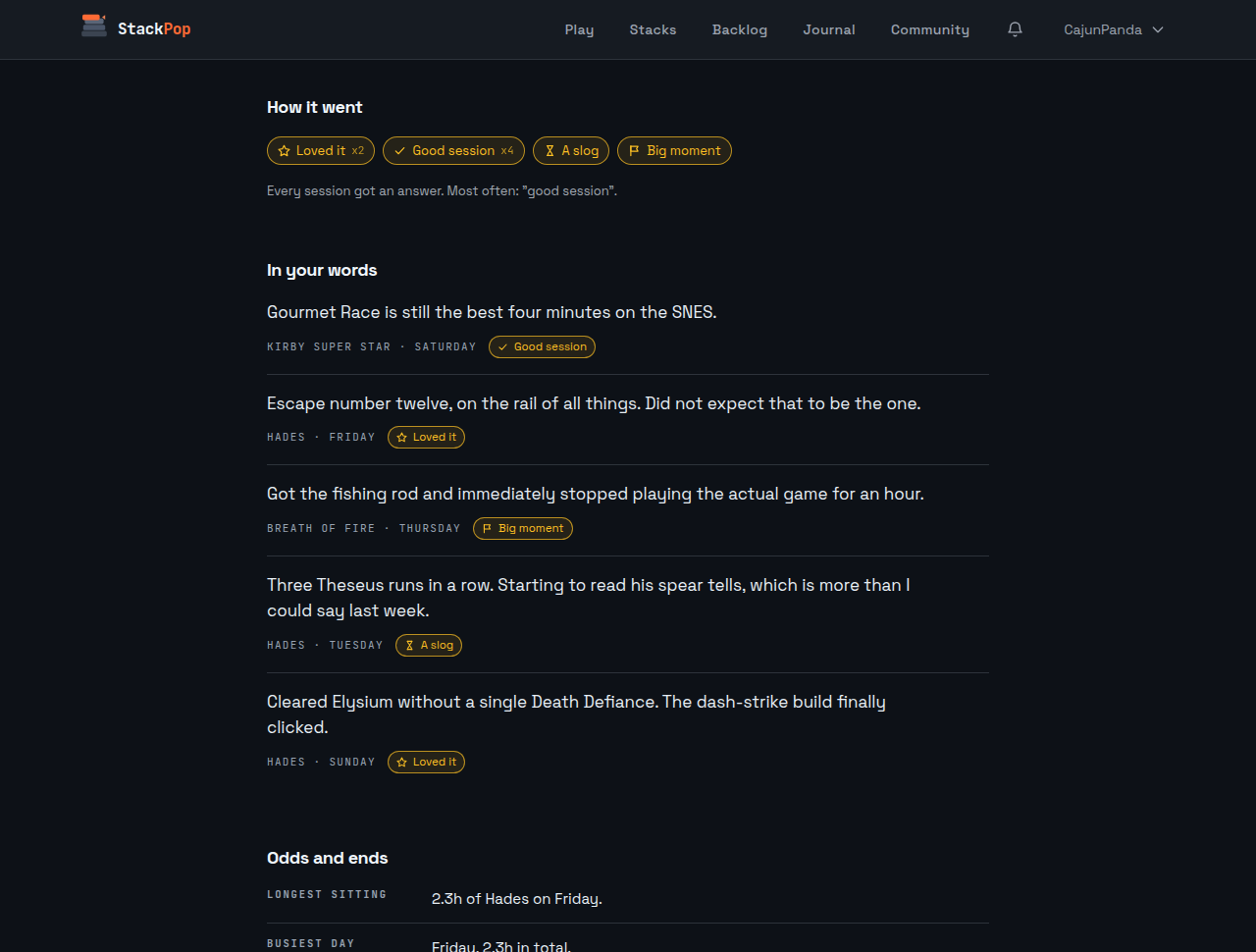
Which is great if you wrote any. Most people don't, and that's the next thing.
You'll find it under Weekly recap in your account menu, or the Your week button on the Journal page.
How was it? One tap.
Sessions have always had a note field. Roughly one in four hand-logged sessions got one, and almost none of the sessions that synced in from Steam. That's not laziness. Typing a sentence about a game you just spent two hours with is a bigger ask than it looks at eleven at night.
So now every session asks one question with five answers: Loved it, Good session, A slog, Not feeling it, Big moment. One tap, no keyboard, done.
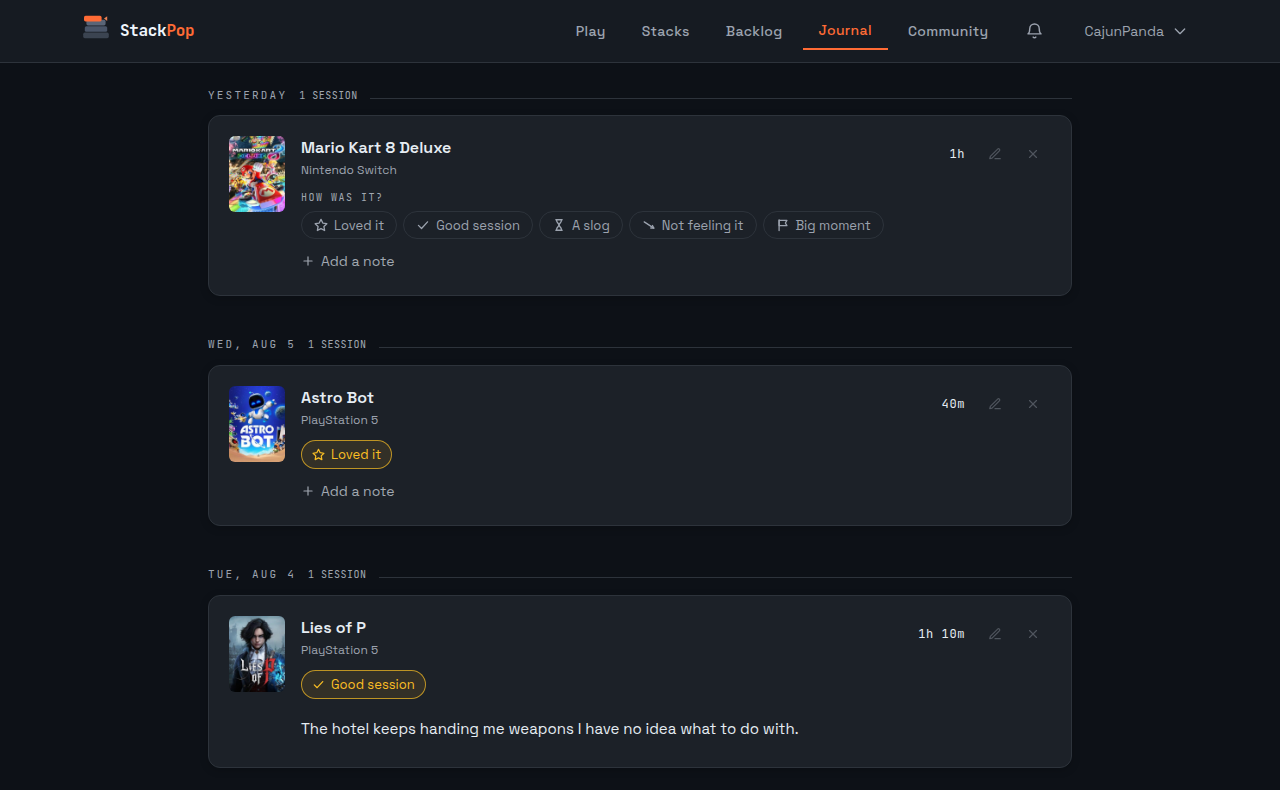
Answer it and a follow-up question appears with the note field under it, so if you do have something to say, you're already halfway into saying it. They show up in the Journal, on the Play page, and in the log dialog.
They also feed the picker, and this is the useful part. A "Not feeling it" on a game StackPop suggested to you is the single strongest signal it has. It beats anything StackPop could infer from you quietly not playing something for three weeks.
Today's pick
The Play page used to greet you with "7 games waiting in Weekend Rotation." True. Also completely useless on the night you can't decide.
Now it names one.
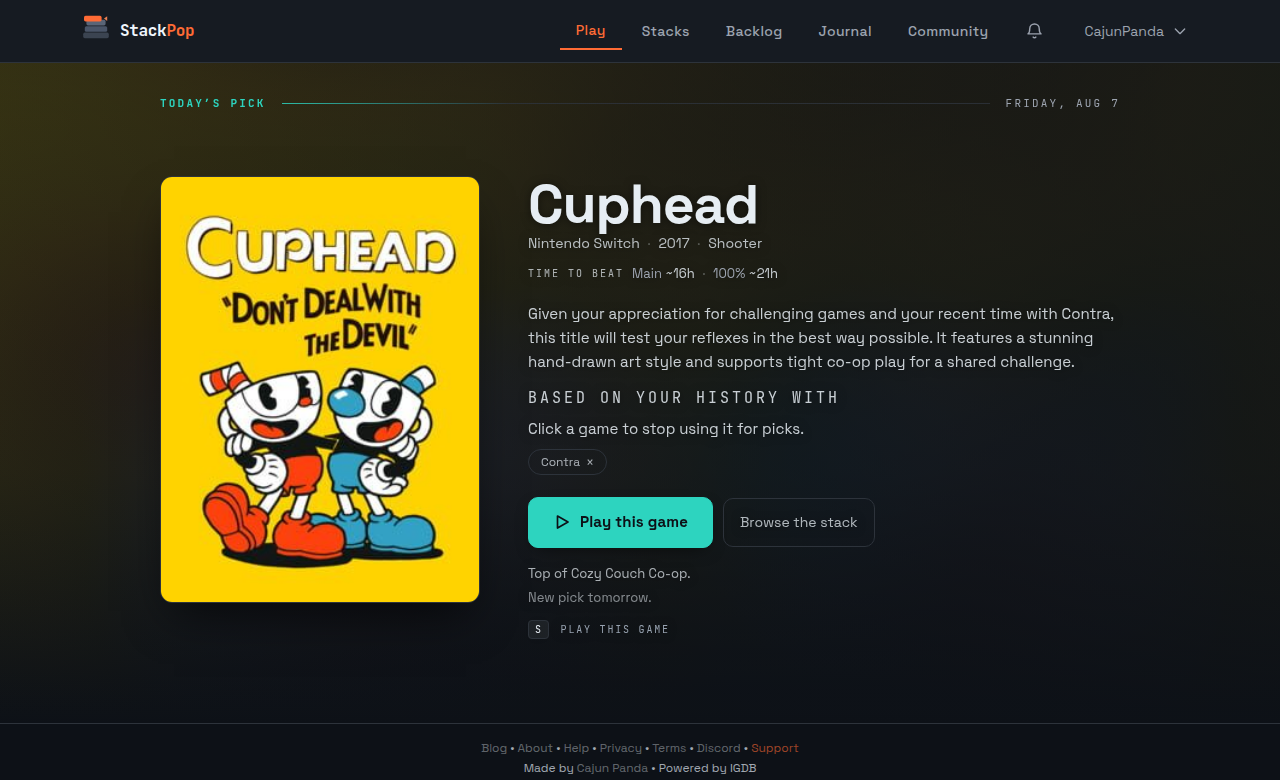
One game from your active stack, with the pitch the picker already wrote for it, plus time to beat so you know what you're agreeing to. It's the same game all day and a new one tomorrow. Play it or ignore it, nothing moves either way. There's a one-line version on the Stacks page too.
Under the pitch you'll see which of your own games it leaned on to get there. Click one and StackPop stops using it for picks. That exists for a specific problem: the cozy farming sim you put two hundred hours into and are completely finished with, which the picker keeps reading as your favorite genre. You keep the completion, the hours, the rating and the badges. It just stops bringing it up.
A bell that tells you what happened
Plenty happened in the background that you never heard about. Games imported. A sync quietly broke. A game couldn't be matched and sat there with no cover art. A badge got earned. All of it real, none of it visible unless you happened to be looking at the right page.
There's a bell in the header now, and everything lands in it.
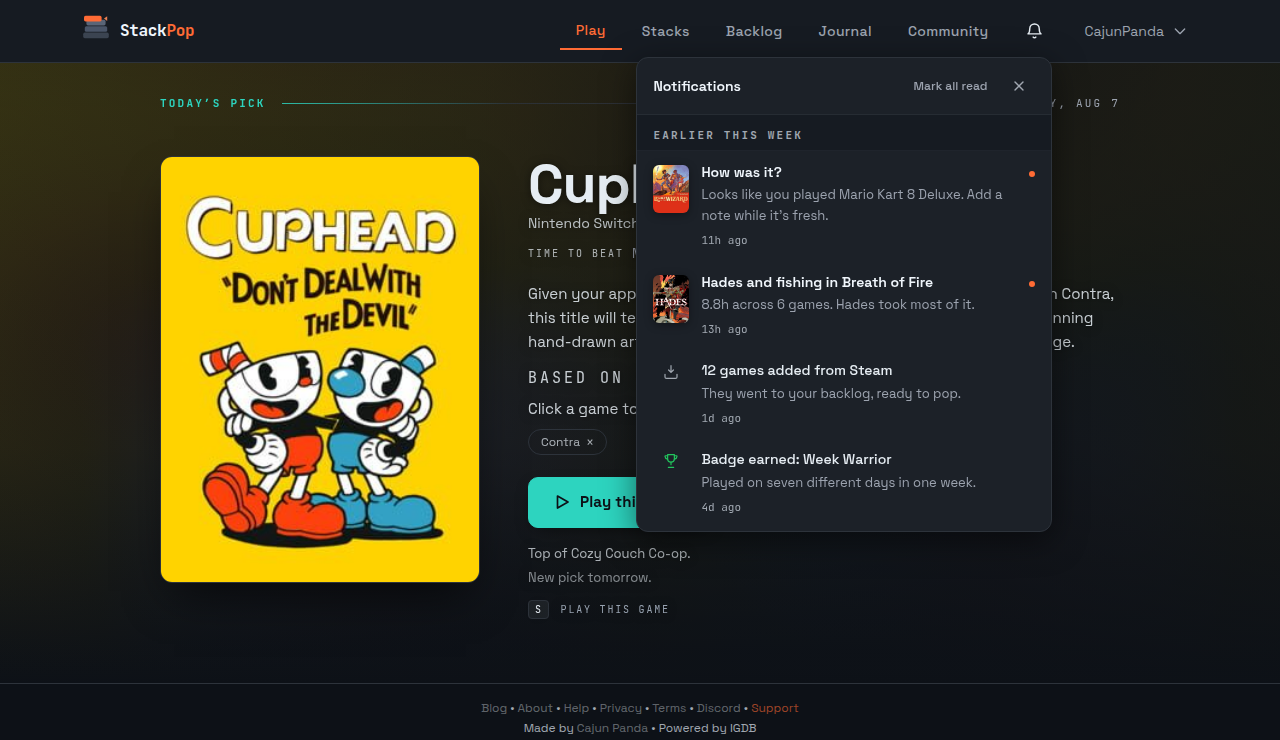
Rows are the whole control. Tap one and it does the thing: opens the recap, opens the note field, takes you to the importer with the fix already showing. There's no second inbox to manage and nothing to file.
Notifications on your phone are separate, off until you turn them on, and split by type in Account. Three are worth having. One asks how a session went after Steam or Xbox syncs it in. One is the Sunday recap. And one is my favorite thing I've built this year: if you press Play and then walk away without pausing, six hours later it asks whether you're still playing, because a timer left running overnight quietly poisons your playtime numbers and you'd never know.
Blog and Feedback moved out of the main nav and into the footer while I was in there. Five items is a nav you can read at a glance.
The backlog stopped throwing you to a new page
This one had been annoying me for months. You scroll two hundred games deep, spot the one you finished last weekend, tap it to leave a rating, and StackPop loads a whole new page. You hit back and you're at the top of your library again.
Not anymore. A game opens in place: a drawer from the bottom on a phone, a panel in the middle on a desktop, your library sitting right where you left it underneath.
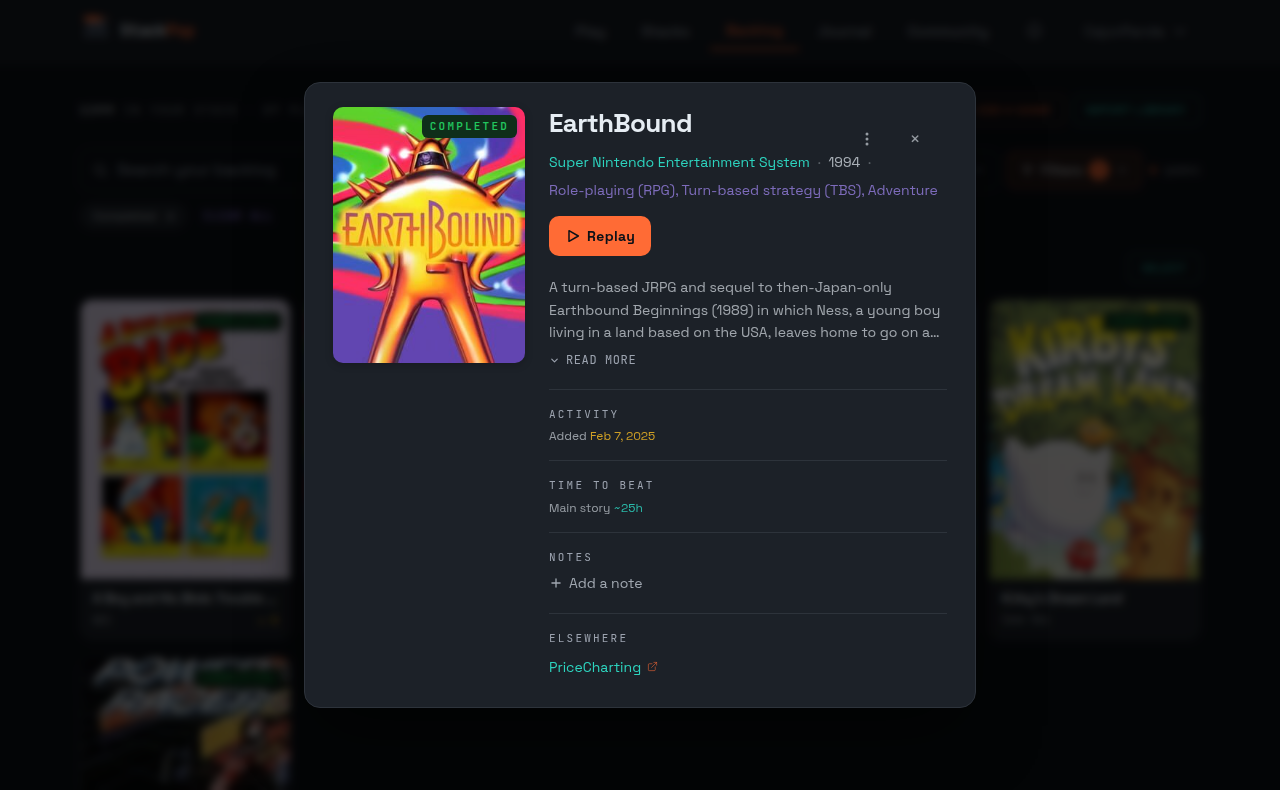
Rate it, note it, mark it complete, shelve it, then close it and you haven't moved an inch. Better, the grid updates behind the panel: if you're filtered to Active and you mark something done, it drops out of the list while you're watching. Close it with the X, tap the dark area, hit Escape, or drag it back down by the handle.
Odds and ends
- Stacks can say what they're for. There's a short note in each stack's settings, and smart top up treats it as the first filter. My before-bed stack stopped offering me forty-hour strategy games the day I wrote "cozy stuff, one sitting" in it.
- You can log playtime from before StackPop. The log dialog has a mode for "I already have three hundred hours in this." It counts toward your lifetime totals and stays out of this week's numbers, so importing a decade of history doesn't make it look like you pulled an impossible weekend.
- Discord got two more commands.
/stackshows your active stack, and/gameshows any game in your library, autocompleting against your own titles as you type. - Game pages link out. Community pages now point at IGDB, Steam, and searches on PriceCharting and GAMEYE, so checking what something is worth is one tap instead of a new tab and some typing.
- Steam imports stop failing silently. If your Steam profile hides game details, Steam refuses to hand over your library, and StackPop used to just sit there empty. Sixteen accounts were in exactly that state with no idea why. There's a banner now that names the setting and gives you a retry button.
- The action menu stays open while you scroll it. That one had no business surviving as long as it did.
- You can support the hosting. There's a Ko-fi link and a supporter mark on your profile if you use it. It buys nothing. Every feature stays free for everyone, and that isn't going to change.
That's the month. If you've been away, the recap is the place to start, and it works retroactively for the last twelve weeks, so go see what you actually played. Log into StackPop and have a look at last week.
Did this land?