Post
My Stacks is here
One Priority Stack wasn't enough. Now you can build a stack for every mood, give each one a color and a set of rules, and pop from whichever you're in.
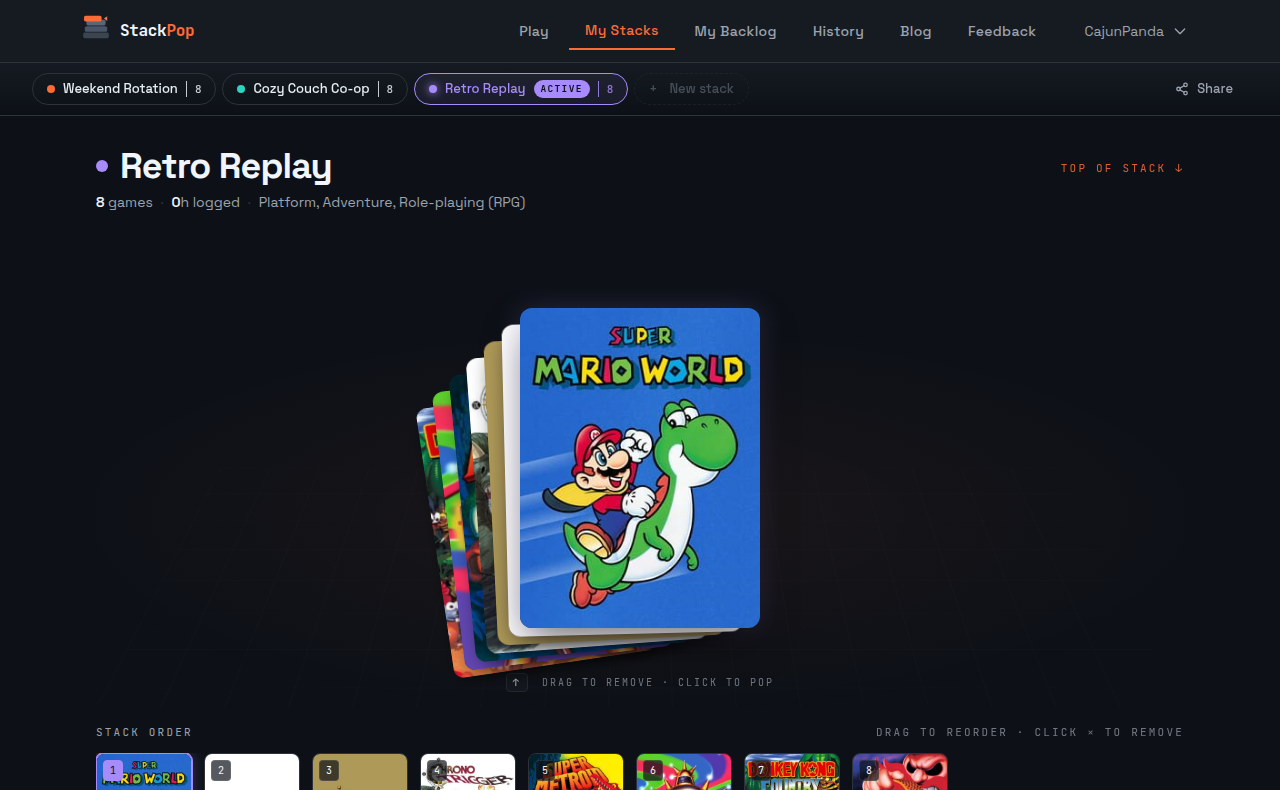
A couple of weeks ago I shipped a working Priority Stack and called it done. Then I watched myself use it for a week and realized one bucket wasn't enough.
My library has a few different shapes of game in it. There are the weekend RPGs I want to fall into for forty hours. There are the half-hour roguelikes I want when I have one cup of coffee left. There are the couch co-op things that only get played when my brother is in town. One Priority Stack mashes all of those together and asks the picker to choose between them. That's the same indecision problem StackPop was supposed to solve. Just smaller.
So now there's My Stacks.
Build a stack for the mood, not the whole library
A stack is a small ordered list of games you actually want to play next. You pick the name. You pick the color. You pick the rules: which platforms count, which genres are in, the minimum rating you'll tolerate, whether to enforce series order so the picker can't hand you Persona 4 before you've played 3.
The /stack page shows your stacks side by side. The top of each one is the next game it'll serve. You can drag to reorder, swipe to remove, and tap any card to peek at the game before you commit. The active stack is the one /play and the /pop slash command in Discord pull from. Switching is a tap.
I have three of them right now. The orange one is "Long sit," anything 30+ hours where I want to feel like I'm in a world. The teal one is "After dinner," 5-to-10 hour stuff that doesn't punish me for putting it down for a week. The purple one is the couch one, local co-op only, and it stays mostly empty between visits. The picker is suddenly very good at me again because it stopped pretending all my games are interchangeable.
Auto top-up so a stack never sits empty
When you pop a game off a stack, the stack refills from your backlog using that stack's rules. So the After dinner stack stays full of 5-to-10 hour games without me having to curate it weekly. If I'm feeling like a long sit I switch to Long sit and the next pop is appropriate to my couch posture.
You can also "Send to bottom" the game you just finished playing so it cycles to the back of the same stack instead of going back to the full backlog pool. Useful for the games you're rotating through but don't want to mark complete yet. The setting is per-stack.
What happened to Priority Stack
If you had a Priority Stack before today, it's still there. I renamed it to whatever you want and it's now one of your stacks. Everything you'd marked priority is still in it. The rules you had set on skip settings got copied onto it as a one-time migration so nothing changes for you on day one. You can leave it alone and the app behaves exactly as before. Or you can spin up a second stack, name it something useful, and start splitting your library by mood.
Try it
Log into StackPop, open My Stacks, hit New Stack, and give one of them a job. Then drag a few games in. Switch to it. Pop. The picker should feel a lot more like a friend who knows you and a lot less like a roulette wheel.
Did this land?