Post
Bring your GAMEYE shelf over
If you catalogue your physical games in GAMEYE, one file now moves the whole shelf into StackPop. Playtime and all.
I have two collections. There's the digital one, which mostly takes care of itself, and there's the shelf. Carts, discs, a few things still in shrink. For years I've catalogued that shelf in GAMEYE, scanning barcodes on the couch while half-watching something.
The problem with a catalogue is that it's a list. It tells you what you own. It has never once told me what to play on a Tuesday night.
So GAMEYE imports now.
One file, the whole shelf
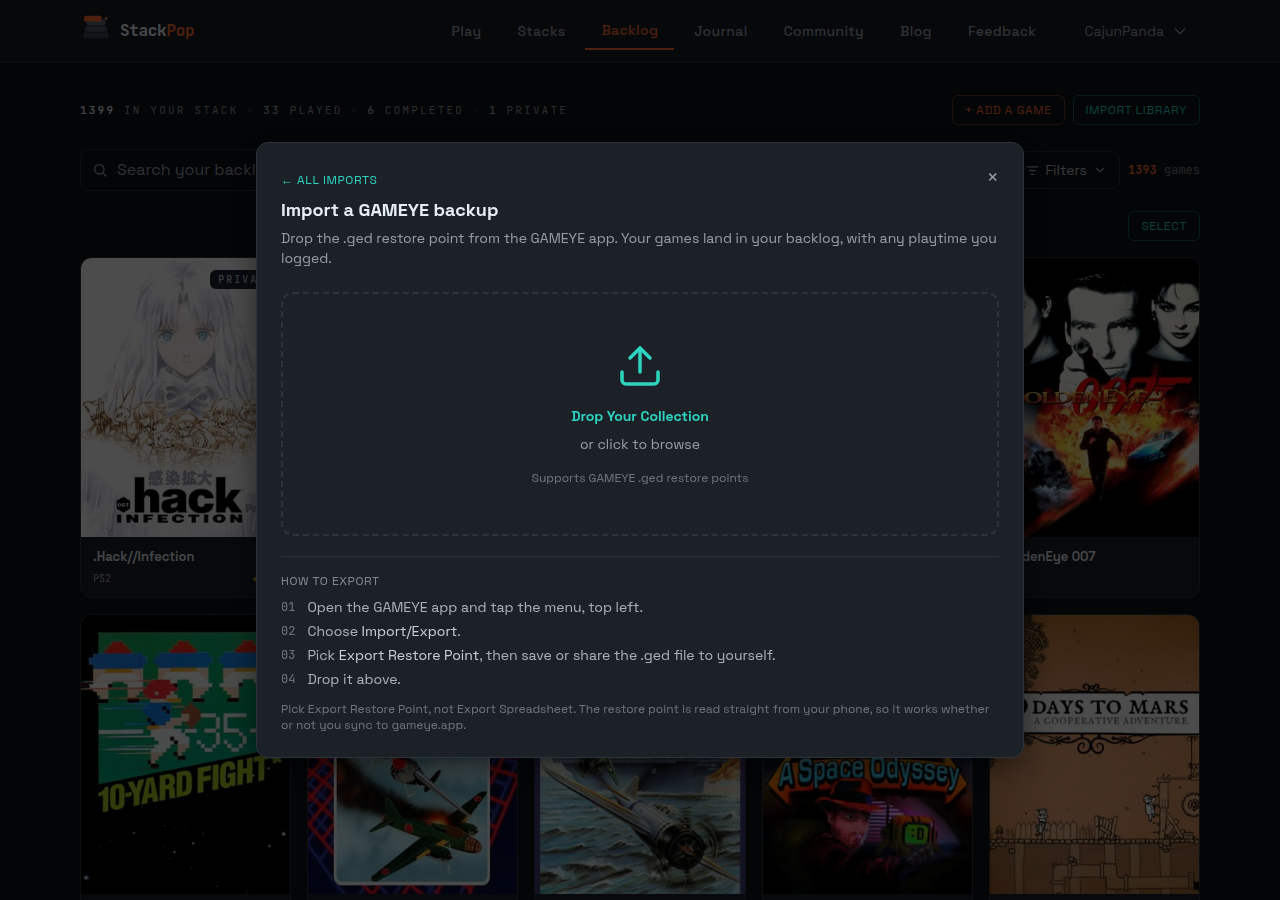
Open the GAMEYE app, tap the menu, go to Import/Export, and pick Export Restore Point. Send the .ged file to yourself however you like. Then open StackPop, hit Import library, expand the GAMEYE section, and drop the file in.
That's it. Your games land in your backlog with the right platform on each, which matters more than it sounds. Four different copies of The Legend of Zelda is not a mistake in your catalogue, it's a shelf. The NES cart, the Wii U re-release, the 3DS one, the funny five-screw variant. They come across as four games because that's what they are, and they'll pop as four games.
Your hours come with it
This is the part I didn't expect to care about as much as I do.
If you've been logging play sessions in GAMEYE, those hours come across. My Contra entry showed up with thirteen hours already on it. Not as a pile of fake sessions cluttering up your history, just a single line that says: you played this, here's how long, it happened before StackPop.
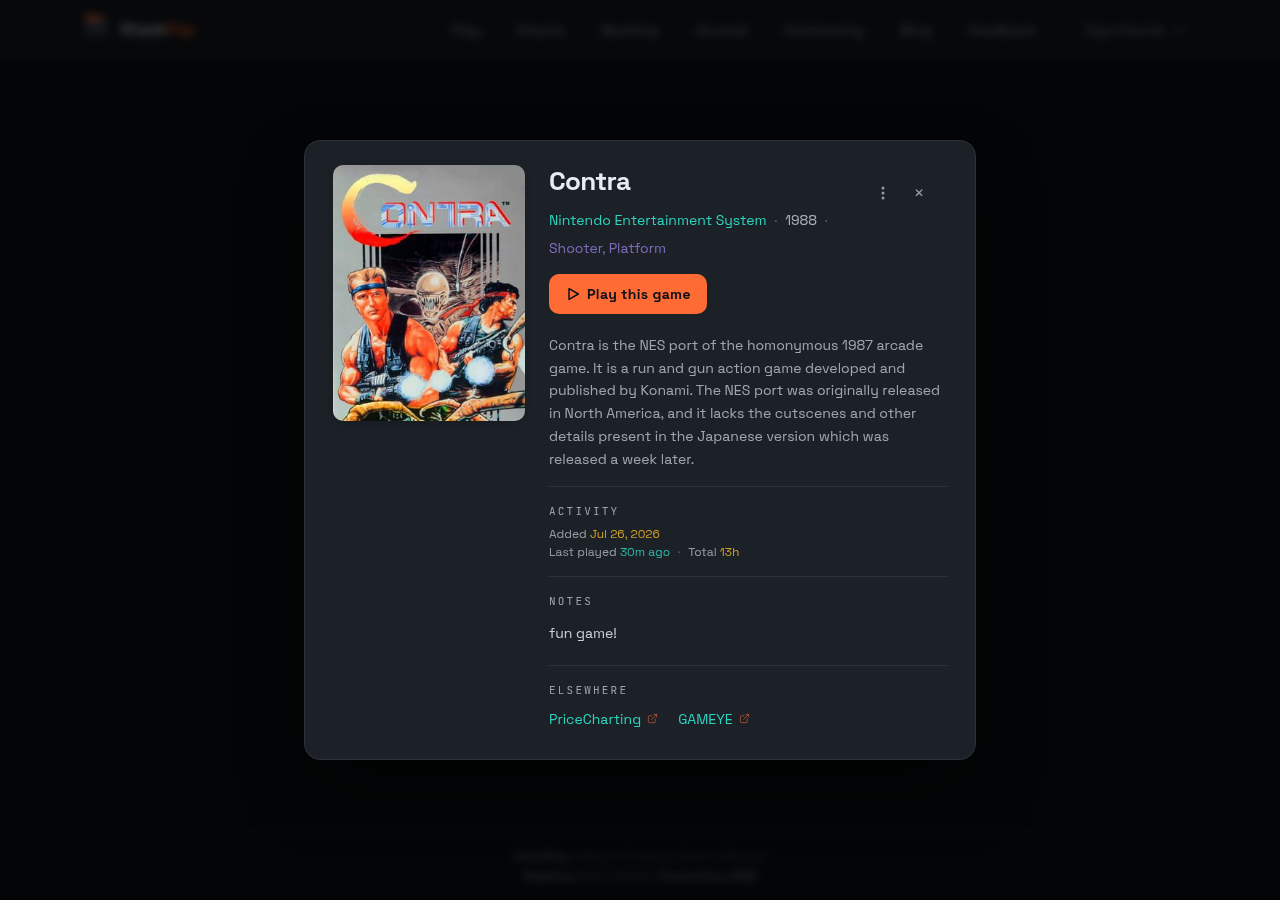
It counts toward your all-time totals and it stays out of your recent activity, so importing a decade of logged play doesn't make it look like you pulled an impossible weekend. Your stats stay honest.
What it deliberately doesn't do
Everything lands in your backlog. Nothing arrives marked as playing or finished.
That's on purpose, and I went back and forth on it. GAMEYE lets you keep several play records per game, and they don't have to be in order or even dated. Mine had a "playing" entry, two "completed" ones, and a paused session sitting on top, all for the same game. There's no honest way to read a single current status out of that, and I'd rather import nothing than import a wrong answer and have you find out three weeks later that half your shelf claims you finished it.
So StackPop takes the hours, which are unambiguous, and leaves the status to you. From the moment you import, this is where play gets tracked.
Your notes survive
Whatever you wrote on a game in GAMEYE comes over as a note. If you'd already written something on that game in StackPop, yours wins. Re-import a newer backup any time you like: nothing duplicates, nothing double-counts your hours, and nothing you've since deleted in GAMEYE gets ripped out of StackPop.
There's also a small thing I added while I was in there. Games that came from GAMEYE or PriceCharting now carry a link to that exact copy, right on the game. Not the game in general, the copy. The five-screw NES cart goes to the five-screw NES page, so you can check what it's worth or read the catalogue entry without hunting for it.
A note on obscure hardware
StackPop matches GAMEYE's platforms to its own, and it covers everything you'd reasonably expect. NES, SNES, Genesis, every PlayStation and Xbox, handhelds, arcade, the home computers.
What it doesn't cover is the true deep end. If you own something on Action Max or a Bandai TVJack5000, the import tells you exactly which games it skipped and why, instead of quietly dropping them and letting you wonder why the count looks short. I'd rather be honest about the gap than pretend.
If your shelf lives in GAMEYE, this takes about a minute, and at the end of it the games you already own start showing up on your Play page instead of sitting in a list. That was always the point. The catalogue knows what you have. StackPop is for actually playing it.
Did this land?